

A Phoenix property management firm lost a $220,000 client last spring because a maintenance request sat unread in a shared inbox for nine days. Nobody dropped the ball on purpose. The process just depended on someone remembering to check. That is the exact gap workflow automation exists to close and most teams find it later than they should.
Here's the thing. Most companies don't lose money on big strategic mistakes. They lose it in handoffs. A form gets submitted and nobody is notified. An invoice waits on one approver's vacation. A new hire shows up with no laptop. Each miss looks small until you add up what those delays cost across a year.
The fix is not hiring more coordinators. It is teaching your software to move work on its own, using triggers, rules and actions that fire the moment something happens. In this blog, we will break down how automated workflows actually run, share real business workflow examples by department and walk through picking and launching your first system.
Quick Answer: Workflow automation is software that moves tasks, approvals and data between people and systems automatically, using a trigger, a set of rules and an action. Instead of someone forwarding emails or updating spreadsheets, the workflow engine routes each step the moment the previous one finishes.
Key Facts
- Processing one invoice costs the average US company $9.40, while the most automated AP teams pay $2.78 (Ardent Partners, 2025).
- The average invoice takes 9.2 days from receipt to ready-to-pay status. Top automated teams close in 3.1 days (Ardent Partners, 2025).
- 94% of SMB knowledge workers say repetitive, time-consuming tasks are part of their role (Zapier, 2021).
- 76% of workers spend one to three hours a day just moving data between places (Zapier, 2021).
- Roughly 60% of occupations contain at least 30% of activities that current technology could automate (McKinsey, 2017).
- Firms contacting a new lead within an hour are about 7x more likely to qualify it. The average business takes 42 hours (Harvard Business Review, 2011).
What Is Workflow Automation?
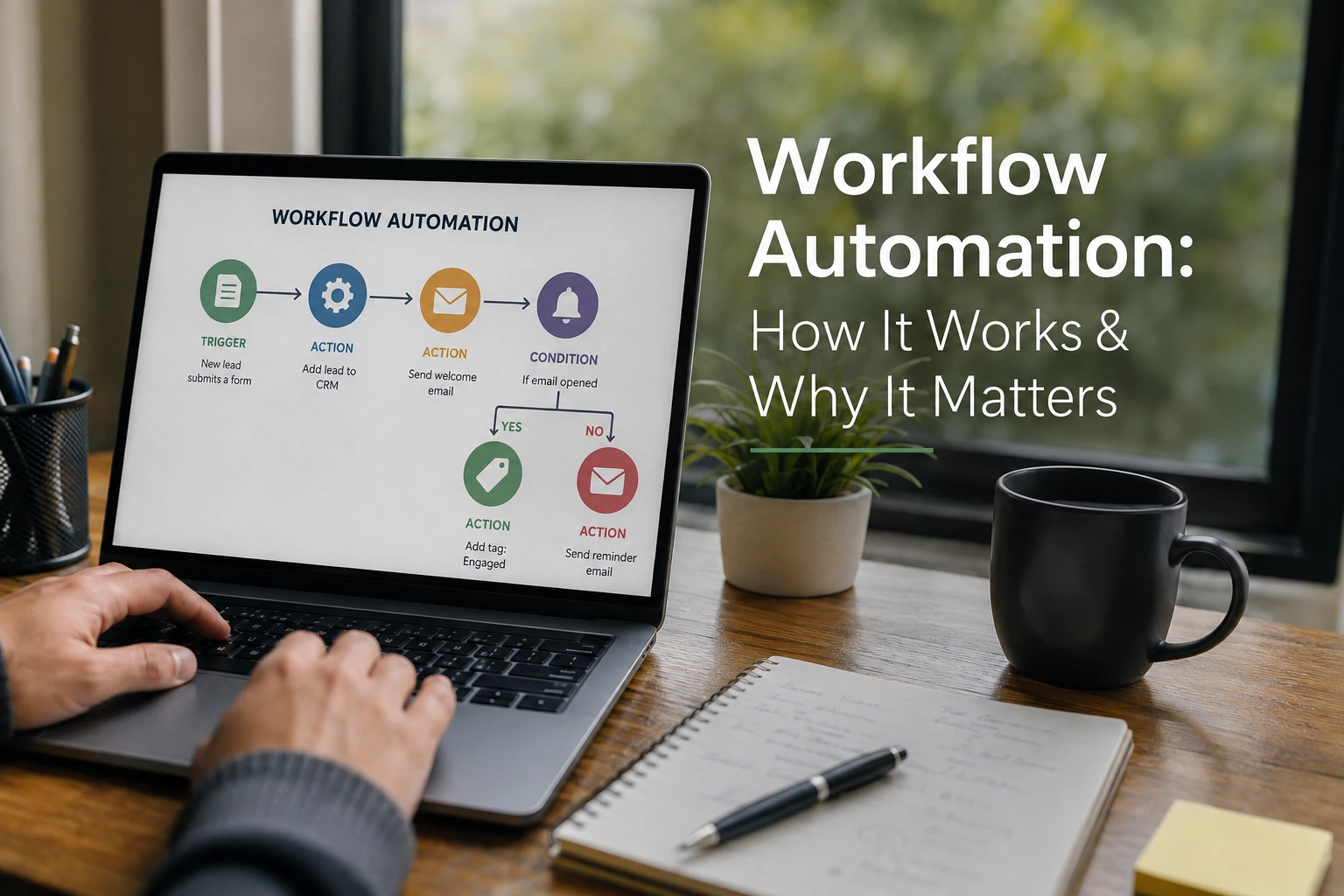
Strip away the vendor language and workflow automation is simple: software that watches for an event, checks a few rules and then does the next step without a person pushing it along.
A business workflow is the repeatable path a piece of work travels. An expense report moves from employee to manager to finance to payment. A job application moves from form to screening to interview to offer. Every company runs on dozens of these paths and most of them live in someone's head, a shared inbox and three spreadsheets.
Workflow automation takes that path and hands the routing to software. The person still writes the expense justification. The software handles submitting it, picking the right approver, sending the reminder on day two and posting the payment file once it clears.
One spelling note, since search engines see both. You'll find it written as work flow automation in older documentation and internal wikis. Two words, one word, same thing.
And people asking what is workflow automation are usually really asking a narrower question: which of my processes should software be running? That answer comes down to repetition and rules. If the work happens weekly and follows the same steps every time, it qualifies.
Workflow Automation vs. BPA vs. RPA
The three get mixed up constantly and vendors don't help, because they use the terms interchangeably in sales decks.
Here's the practical split:
| Approach | What it automates | Where it fits |
|---|---|---|
| Workflow automation | A defined task sequence: triggers, rules, approvals, notifications | Routing work between people and apps |
| Business process automation (BPA) | An entire cross-department process, sometimes dozens of workflows | Order-to-cash, procure-to-pay, claims handling |
| Robotic process automation (RPA) | Screen-level actions a human would perform: clicks, keystrokes, copy-paste | Legacy systems with no API |
Think of it as nesting dolls. RPA is a bot doing one human task. Workflow automation is the chain of tasks. BPA is the whole operation those chains belong to.
A lot of people assume they need RPA when they really need a workflow. If your apps have APIs or prebuilt connectors, a standard workflow tool is cheaper and breaks less. RPA earns its keep when you're stuck with a 2009-era system that only speaks screens.
How Workflow Automation Works
Every automated workflow runs on the same skeleton, whether it's a two-step Zapier zap or an enterprise approval chain. Something happens. The system checks conditions. The system acts. Then it logs what it did.
Walk through a real one. A sales rep at a Denver software company closes a deal in the CRM and flips the stage to Closed Won. That stage change is the trigger. The workflow checks the deal size. Under $25,000, it creates the invoice draft and notifies accounting. Over $25,000, it first routes the contract to a manager for a countersignature check. Either way, the customer gets a welcome email, the onboarding project gets created and every step lands in a log with a timestamp.
Nobody forwarded anything. Nobody remembered anything. The workflow did the remembering.
That last part, the log, gets ignored in most buying decisions and then becomes the thing finance and auditors care about most. Most people realize this too late.
Triggers, Rules and Actions
Three building blocks show up in every business workflow, no matter the platform:
- Triggers start the run. A form submission, a new database row, an email with an attachment, a status change, a date arriving. Time-based triggers matter more than people expect. A workflow that fires every morning at 7 to flag overdue invoices is still automation.
- Rules decide the path. If the amount is over $5,000, go to the director. If the ticket says billing, route it to the billing queue. If the field is empty, stop and ask. This if-then logic is where the real design work lives.
- Actions do the thing. Create a task, update a record, send the Slack message, generate the PDF, move the file, post to the ledger.
Chain those three and you have a workflow. Chain workflows and you have an operation that keeps moving while you sleep.
What a Business Workflow Engine Does
The business workflow engine is the part you never see. It's the layer inside the platform that evaluates rules, assigns tasks, enforces deadlines and keeps the audit trail.
The engine is also what separates toy automation from something you can run a company on. Watch what it handles when things go sideways:
- A step fails because an app was down. The engine retries, then routes the item to an exception queue instead of losing it.
- An approver sits on a request for three days. The engine escalates to their manager automatically.
- An auditor asks who approved a $40,000 payment in March. The engine produces the record in seconds, with the rule that applied and the timestamp.
Cheap tools skip most of this. That's fine for marketing tasks. It's a real problem for anything touching money, contracts, or regulated data.
The 3 Main Types of Workflow Automation
Most platforms now blend all three of these, but knowing the split helps you buy the right thing.
Rule-Based Workflows
The classic form. Fixed if-then logic that runs the same way every time. An expense under $500 auto-approves. A ticket tagged urgent pages the on-call. These are predictable, cheap and easy to audit, which is exactly why regulated industries still lean on them. The limitation is rigidity. The workflow only handles situations someone thought to write a rule for.
Integration-Based Workflows
These move data between apps that don't natively talk. A new Shopify order creates a QuickBooks invoice and a ShipStation label. A new CRM contact syncs to the email platform. Tools like Zapier, Make and Power Automate built their businesses here and iPaaS platforms handle the heavier versions. The failure mode is silent breakage. An app updates its API, a connection expires and orders quietly stop syncing. Set up failure alerts on day one. Not day ninety.
AI-Powered Workflows
The newer layer. Instead of fixed rules, an AI model reads the input and decides. It categorizes the support ticket by reading it, extracts invoice fields from a messy PDF, drafts the follow-up email for a human to approve. Agentic setups go further and let the AI plan multi-step actions toward a goal. Useful, genuinely. But teams tend to drop the human review step too early and one confidently wrong AI decision in a payment workflow costs more than a year of the software. Keep humans in the loop for anything with dollar signs attached.
Why Your Business Needs Workflow Automation
The case isn't abstract. It shows up in four places you can measure.
Time and Cost Savings
Invoice processing is the cleanest example because the benchmarks are public. Ardent Partners' 2025 numbers put the average cost of handling a single invoice at $9.40, while the most automated AP teams get it down to $2.78. Same document, same outcome, less than a third of the cost. Cycle time shows the same spread: 9.2 days on average against 3.1 days for the top performers.
Multiply that across a mid-sized company pushing 1,000 invoices a month and the gap is real money. Around $80,000 a year, before counting the late fees and missed early-payment discounts that slow processing quietly racks up.
And invoices are one workflow. The same math applies to onboarding, contracts and lead handling.
Fewer Errors and Cleaner Data
Manual handoffs create typos, skipped steps and version confusion. Zapier's research found 76% of workers spend one to three hours a day just moving data between places and every one of those copy-paste hours is a chance to fat-finger a number.
Automated workflows copy the value once, from the source, the same way every time. The error rate doesn't drop to zero. Bad source data still flows through, which is its own lesson. But the transcription errors, the ones where someone typed 15,000 instead of 1,500, mostly disappear. Ask anyone who has unwound a misdirected wire transfer what that's worth.
Scale Without Adding Headcount
Growth used to mean a hiring spreadsheet. Fifty more clients meant another coordinator. What automation changes is the ratio. The workflow that onboards 10 customers a month onboards 60 without noticing, because software doesn't queue.
What we often see in practice: the first automation project pays for itself not by cutting anyone but by absorbing growth the team couldn't have handled. A three-person ops team stays a three-person ops team through a year the business doubled. That's the actual return and it never shows up as a line item.
Visibility, Accountability and Compliance
When work moves through email, nobody can answer the basic questions. Where is it? Who has it? How long has it sat?
A workflow system answers all three on a dashboard, which changes meetings more than people expect. Status updates stop being a guessing game.
The compliance side matters even more in regulated industries. Every action logged, every approval tied to a named person and a rule. Come SOX season, or a HIPAA audit, or a customer's SOC 2 questionnaire, that audit trail is the difference between an afternoon of exports and three weeks of email archaeology. Competitors use this aggressively in enterprise sales, by the way. A fully auditable process closes deals.
Business Workflow Examples Across Departments
Business workflow examples land better than definitions, so here are five that show up in almost every company, with the trigger and the payoff spelled out.
HR: Employee Onboarding
A 60-person Nashville healthcare staffing firm was losing new hires' first days to chaos. No laptop, no logins, paperwork chased over text. The fix: when a candidate flips to Hired in the ATS, the workflow opens an IT provisioning ticket, sends payroll and benefits forms for e-signature, books orientation and assigns the 30-day training checklist. First-day readiness went from a coin flip to nearly automatic and HR stopped playing air traffic control every Monday.
Finance: Invoice Approvals
The workflow reads the incoming invoice, matches it to a purchase order and routes by amount. Under $1,000 auto-approves with a log entry. Up to $10,000 goes to the department head. Above that, the controller sees it. Reminders fire at 48 hours, escalation at 96. Nobody's vacation stalls a payment run anymore and the three-way match happens on every invoice instead of only the ones someone had time to check.
Sales: Lead Routing and Follow-Up
Speed decides deals here. The Harvard Business Review's well-known audit of 2,241 firms found companies reaching a lead within an hour were about seven times likelier to qualify it than those waiting even one hour more. The average business took 42 hours.
That gap is the whole opportunity. An automated business workflow assigns the lead by territory the second the form submits, alerts the rep in Slack and sends a holding email so the prospect hears back in two minutes instead of two days. If the rep doesn't act within 30 minutes, it reroutes. Simple and it routinely beats hiring another SDR.
Marketing: Campaign Execution
A campaign is really a bundle of small handoffs: the form, the list, the tags, the drip sequence, the sales alert. Automation stitches them together. Download the pricing guide and you're tagged, dropped into a five-email nurture and scored. Cross the score threshold and sales gets pinged with context. Marketing teams usually automate before anyone else, partly because the tools are mature and partly because manual list management stops being possible past a few thousand contacts.
Customer Support: Ticket Routing
Incoming tickets get read, categorized and routed by topic, plan tier and severity. Enterprise customer plus outage keyword equals straight to tier two with a page to the on-call. Password reset goes to the self-serve flow. SLA timers run underneath, escalating anything about to breach. Customers feel it as faster answers. Support managers feel it as the queue finally emptying by Friday.
A Company Workflow Example From Start to Finish
Here's a complete company workflow example from a 22-person Chicago freight brokerage. Client onboarding was their choke point.
The old version: sales closed a client, then emailed operations. Ops set the client up in the transportation system, emailed accounting for a credit check, waited, emailed the client a paperwork packet, waited again, then scheduled a kickoff call. Average time from signed contract to first shipment: six business days. Two clients backed out during the wait in one quarter alone. That got ownership's attention.
The automated version runs off one trigger, the e-signature completing:
- The engine creates the client record in the TMS from the contract fields.
- The credit application goes to the client instantly and its completion triggers the accounting review task with a 24-hour deadline.
- Portal logins provision automatically once credit clears.
- The kickoff call books itself through a scheduling link in the welcome email.
- Every step posts to a shared channel, so anyone can see where a new client sits.
New timeline: same day to next day. The ops manager got roughly nine hours a week back and the build took about two weeks on a platform costing $67 a month at their seat count.
The part worth copying is not the tool. It's that they mapped the ugly real process first, workarounds included, then automated the cleaned-up version.
How to Choose Between Business Workflow Systems
Business workflow systems range from $20-a-month connectors to six-figure enterprise platforms and the category names blur together on purpose. A few honest filters cut the list fast.
Start with what you already pay for. Microsoft 365 shops have Power Automate sitting in their license. Google-heavy teams usually start with Zapier or Make. Companies living inside a work platform like monday.com, Asana, or ClickUp often find the built-in automations cover the first year of needs. Buying a separate engine before exhausting what you own is the most common overspend we see.
Then match the tool to the workflow's stakes. Marketing handoffs can run on almost anything. Payment approvals and regulated data need the audit trail, the permissions and the SOC 2 paperwork and that usually means the pricier tier.
Features Worth Paying For
When you do compare platforms, weigh these over the demo gloss:
- Connector depth. Not the count on the homepage. Whether your specific apps, including the weird industry one, have prebuilt connections that support the actions you need.
- A builder your operations people can actually run. If every change waits on IT, the system calcifies. The people closest to the work should be able to edit their own workflows.
- Error handling and alerts. Retries, exception queues and a notification when something fails. Silent failure is the deal-breaker.
- Audit logs and role-based permissions. Non-negotiable for finance, HR and healthcare data.
- Reporting on the workflows themselves. Cycle times, bottleneck steps, volumes. You can't fix what the system won't show you.
- Pricing model fit. Per-task pricing punishes high-volume workflows. Per-seat pricing punishes wide rollouts. Model your real volume before signing anything annual.
One more filter that saves pain later: ask the vendor what happens when a run fails halfway. The quality of that answer tells you most of what you need.
How to Implement Workflow Automation in 6 Steps
Rolling out workflow automation goes wrong in predictable ways, usually by starting too big or automating a mess. This sequence avoids the common wrecks.
- Pick one painful, frequent, rule-based process. Weekly or daily volume, clear steps, obvious annoyance. Invoice approvals, lead routing and onboarding are classic first wins. Skip anything requiring judgment on every item.
- Map how it actually runs today. Not the official version. Sit with the people doing it and capture the real steps, the workarounds, the wait times and the last month of exceptions. This takes an afternoon and prevents most failures.
- Fix the process before you automate it. Cut the approval nobody reads. Merge the duplicate data entry. Automating a broken process just makes mistakes arrive faster.
- Build the workflow, starting narrow. One trigger, a few rules, clear actions. Add branches after the spine works. Name a single owner, because unowned automations rot.
- Test with real cases, then run parallel. Feed it last month's actual items, including the malformed ones. Then run it alongside the manual process for a week or two before cutting over. Boring and worth it.
- Monitor, measure and prune quarterly. Track cycle time, error rate and hours saved against your pre-automation baseline. Expand what works. Kill what nobody uses. The pruning is the step everyone skips and it's why companies end up with 200 workflows and no idea which 40 still matter.
Where Workflow Automation Is Headed
Three shifts are worth watching and none of them require a crystal ball, because they're already shipping.
Natural-language building is collapsing the setup cost. Describing the workflow in a sentence and getting a draft to edit is becoming the default across the major platforms.
AI agents are moving from single steps to whole sequences. Instead of a fixed chain, the agent takes a goal, plans the steps and executes with checkpoints. Early and impressive and still the kind of thing you supervise closely for anything involving money.
And orchestration is becoming the real differentiator as companies stack up dozens of workflows. Coordinating how they interact, sequencing them across systems and watching the whole board matters more once the easy automations are done. Generally speaking, the winners over the next few years look less like teams with the most workflows and more like teams whose workflows behave as one system.
Key Takeaways
- Workflow automation moves tasks, approvals and data on triggers and rules, so work advances without anyone forwarding it.
- The savings are measurable: handling an invoice costs $9.40 on average against $2.78 for the most automated teams (Ardent Partners, 2025).
- Automate one frequent, rule-based process first and fix it before you automate it.
- Buy the audit trail, error alerts and permissions for anything touching money or regulated data.
- Review automated workflows quarterly. Retire the dead ones, expand the ones saving real hours.
Conclusion
Workflow automation is not about replacing people. It is about ending the part of the job where a smart person copies data between tabs and chases approvals over Slack. Start with one business workflow that hurts, usually invoices, onboarding, or lead handoffs. Map it honestly, workarounds included. Then let the workflow engine handle the routing, reminders and audit trail while your team handles the judgment calls. That split is where the returns live. The businesses seeing real gains treat business workflow systems as an operations habit, not a one-time software purchase. They review their automated workflows quarterly, retire the ones nobody uses and expand the ones saving real hours. Do that and the math works out fast. A few hundred dollars a month in software, set against thousands of hours of manual routing a year, is one of the easier budget calls you will make this year.
Sources
- Ardent Partners, AP Metrics That Matter in 2025, invoice cost and cycle-time benchmarks, summarized by WEX (2025): https://www.wexinc.com/resources/blog/what-does-it-cost-to-process-an-invoice-ap-benchmarks-every-finance-team-should-know/
- Zapier, The 2021 State of Business Automation (2021): https://zapier.com/blog/state-of-business-automation-2021/
- Zapier, Report: How Office Workers Spend Their Time (2021): https://zapier.com/blog/report-how-office-workers-spend-time/
- McKinsey Global Institute, Jobs Lost, Jobs Gained: What the Future of Work Will Mean for Jobs, Skills and Wages (2017): https://www.mckinsey.com/featured-insights/future-of-work/jobs-lost-jobs-gained-what-the-future-of-work-will-mean-for-jobs-skills-and-wages
- Harvard Business Review, The Short Life of Online Sales Leads by James Oldroyd (2011), response-time figures summarized by LeanData (2026): https://www.leandata.com/blog/speed-to-lead-speed-is-the-key-to-lead-conversion/
— Bookmark our website for future reference, and explore our site to access more detailed expert content.
Frequently Asked Questions
Is it work flow automation or workflow automation?
Workflow automation, one word for workflow, is the standard spelling. Work flow automation shows up in older documents and search queries, but both refer to the same thing: software that routes tasks and data automatically.
How much does workflow automation cost for a small business?
Entry plans on tools like Zapier or Make start around $20 to $30 monthly and mid-market platforms run $10 to $30 per user each month. Most small teams spend under $200 a month before hitting enterprise features.
How long does it take to build a first automated workflow?
A simple two-app workflow, like saving form submissions to a spreadsheet and sending an alert, takes under an hour. Multi-step approval workflows with conditions usually take a few days of building and testing.
Do you need coding skills to automate business workflows?
No. Most business workflow systems use no-code, drag-and-drop builders. Coding only matters for custom API connections, unusual data transformations, or legacy systems without prebuilt connectors, where a developer might spend a few hours on scripts.
How do you measure whether an automated workflow is paying off?
Track cycle time, error rate and hours saved before and after automation. If a process dropped from five days to one and rework fell, the workflow is paying for itself. Review the numbers quarterly.
Can workflow automation connect to legacy software without an API?
Yes, though it takes more work. Teams use RPA bots that mimic clicks, scheduled file transfers, email parsing, or middleware. Expect these bridges to be more fragile than native API integrations.
Will workflow automation eliminate jobs on my team?
Usually it shifts work rather than cuts it. Automation absorbs routing, reminders and data entry, while people keep exceptions, judgment calls and customer conversations. Many teams redeploy saved hours instead of reducing headcount.
What happens when an automated workflow fails mid-run?
Good platforms log the error, retry the step and alert an owner. Failed items land in an exception queue for human review. Without that safety net, failures go silent, which is the real danger.
Which workflow should a business automate first?
Pick a process that runs at least weekly, follows consistent rules and annoys everyone. Invoice approvals, lead routing and employee onboarding are common first wins because the steps are predictable and the volume justifies the setup.
Is workflow automation safe for financial or healthcare data?
It can be, if the platform offers encryption, role-based access, audit logs and certifications like SOC 2, plus HIPAA support where needed. Regulated businesses should confirm data residency and retention policies before routing sensitive records.
Can a team of five people justify workflow automation?
Yes. Small teams often see returns faster because one person usually carries several manual processes. Automating even two workflows, like intake and follow-up, can free several hours weekly for around $30 a month.
Should you automate a process that is already broken?
No. Automating a broken process just produces mistakes faster. Map the workflow, remove pointless steps and unclear approvals, then automate the cleaned-up version. Fixing before automating is where most of the gains come from.
How do approval thresholds work in automated workflows?
Rules route items by value or risk. An expense under $500 might auto-approve, $500 to $5,000 goes to a manager and anything higher reaches finance. Thresholds keep approvals fast without losing control.
When does a business need workflow orchestration instead of simple automation?
When multiple automated workflows, systems and teams must run in a coordinated sequence, like order-to-cash. Orchestration manages dependencies and timing across workflows, while automation handles the individual task chains inside each one.
When should a business move workflows off spreadsheets?
When version conflicts appear, more than two people update the same sheet, or missed handoffs start costing money. Spreadsheets track data fine, but they cannot trigger actions, send reminders, or enforce approvals.
What is a workflow trigger?
A workflow trigger is the event that starts an automated workflow. The workflow engine watches for the event and launches the defined steps. For example, a submitted expense form can trigger an approval request to a manager.
What is a business workflow engine?
A business workflow engine is the software component that executes workflow rules. It evaluates conditions, routes tasks, enforces deadlines and records each action. For example, an engine can send invoices above $5,000 to a finance director.
What is conditional logic in workflow automation?
Conditional logic is the if-then rule structure that decides a workflow's path. The engine checks data against set criteria and branches accordingly. For example, a support ticket marked urgent can skip the queue and page an on-call agent.
What is human-in-the-loop automation?
Human-in-the-loop automation is a workflow design that pauses for human review at defined points. Software handles routine steps while people approve exceptions. For example, a refund workflow may auto-process small amounts but hold large ones for a manager.
What is a no-code workflow builder?
A no-code workflow builder is a visual interface for creating automated workflows without programming. Users connect triggers, conditions and actions through drag-and-drop blocks. For example, an operations manager can build a lead-routing workflow in an afternoon.
What is an audit trail in workflow automation?
An audit trail is the chronological record of every action a workflow performs. It documents who approved what, when and under which rule. For example, auditors use workflow logs to verify expense approvals during a SOX review.
What is iPaaS in workflow automation?
iPaaS, or integration platform as a service, is cloud software that connects separate applications so workflows can pass data between them. For example, an iPaaS connector can sync new CRM deals into an accounting system automatically.
What is exception handling in an automated workflow?
Exception handling is the process a workflow follows when a step fails or data falls outside expected values. Items route to a review queue instead of stalling. For example, an invoice missing a purchase order number escalates to accounts payable.
What is agentic AI in workflow automation?
Agentic AI refers to software agents that plan and execute workflow steps autonomously rather than following fixed rules. The agent interprets goals and chooses actions. For example, an AI agent can draft, route and revise a purchase request.
What is a workflow template?
A workflow template is a prebuilt workflow structure that teams adapt instead of building from scratch. Templates include standard triggers, steps and approvals. For example, most platforms ship employee onboarding templates covering paperwork, provisioning and training tasks.
What information should I gather before mapping a workflow for automation?
List every step, its owner, the trigger, average wait time between steps and last month's exceptions. Pull real examples, not the official process doc. The workarounds people invented are usually where automation breaks.
Which platform should a 15-person team try first?
Start with whatever your current stack includes. Microsoft 365 licenses include Power Automate, Google-centric teams usually test Zapier or Make and teams already in monday.com or Asana should try the built-in automations before buying anything new.
How do I write my first approval rule?
Pick one threshold and one owner. For example: if the invoice total is under $1,000, approve and log it. If $1,000 or more, assign it to the finance manager with a 48-hour deadline and a reminder.
What should I test before switching a workflow live?
Run last month's real items through it, including duplicates, blank fields and odd amounts. Confirm failure alerts reach a named person. Then run automated and manual side by side for a week before cutting over.
How often should automated workflows be reviewed?
Check error queues weekly and run a full review quarterly. Compare cycle time and volume against your baseline, retire workflows nobody triggers anymore and update rules that no longer match how the team works.